AliExpress & Alibaba Image, Video & Invoice Downloader
Download AliExpress and Alibaba product images, customer review photos and videos in one click - then generate itemized PDF purchase invoices and receipts from your order page. Fast, lightweight and completely private.
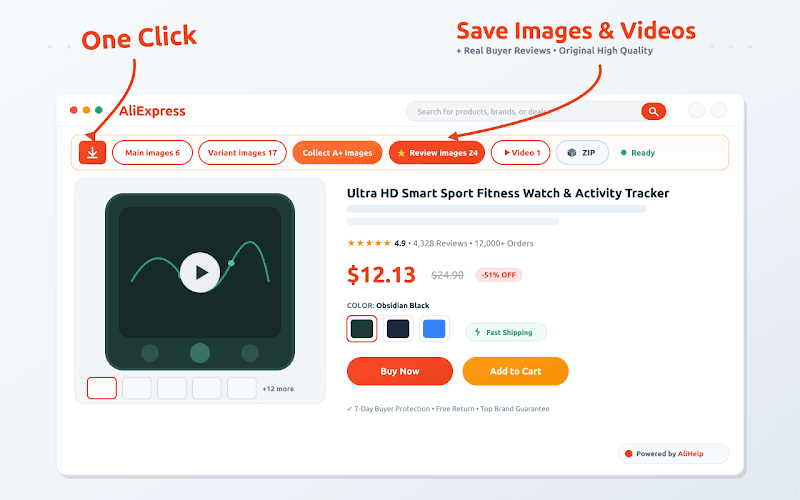
One toolbar on every product page
Every image, every video, and the paperwork too
No more right-clicking one file at a time, low-resolution screenshots, or missing receipts. AliHelp pulls full-resolution media straight from the source CDN and exports print-ready PDF invoices - all inside your browser.
One-Click Bulk Image Downloader
Full resolutionSaves every gallery photo from a product page at once, uncompressed and straight from the source CDN - the original file, not a resized copy.
Variant & Style Swatches
Extracts the photos for every colour, size and model variant and keeps them separated, instead of only the variant you happen to be viewing.
Description & A+ Content Graphics
Often missedPulls the specification tables, size charts and manufacturer infographics hidden inside the expanded description area that a normal save misses.
Product & Supplier Video Downloader
Saves listing demo videos and factory showcase clips as original-quality MP4 files - a clean download, not a re-encode.
Customer Review Photos & Videos
Social proofDownloads authentic buyer feedback images and unboxing videos, so you can judge real-world quality before you order - or use genuine proof on your own store.
1-Click PDF Invoice & Receipt Generator
Tax readyTurns any AliExpress order into a structured commercial invoice for bookkeeping, customs, tax reporting and expense records - on an A4 print-ready layout.
Bulk Order Sourcing & Date Filters
Pick a quarter or a full tax year and collect every order in that range into one consolidated summary, with an Invoice button beside each purchase.
ZIP Packaging & Auto-Organized Files
Packs downloads into a tidy ZIP archive and sorts assets by product name, so files from different listings never end up mixed together.
Dual Platform, No Sign-Up
Works on both AliExpress retail listings and Alibaba wholesale supplier catalogs. No registration, no account, no watermarks added to anything.
What it looks like on a real listing
Screenshots from live AliExpress and Alibaba pages - the toolbar, the review media grid, the generated invoice and the bulk order manager.
One toolbar on every product page
The bar appears near the top of any AliExpress listing and counts what it found - main images, variant images, A+ graphics, review photos and video. Click a group to save it, or take everything at once.
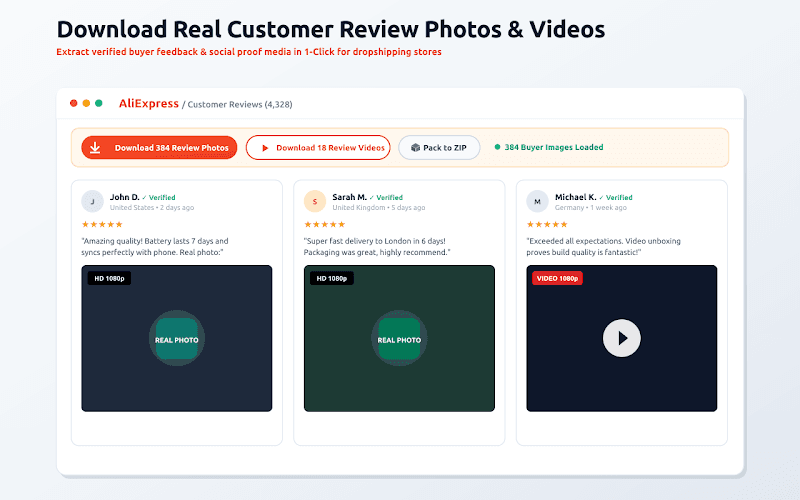
Real buyer review photos and videos
Loads the verified buyer feedback media on a listing - hundreds of photos and unboxing clips - and saves them in one pass, in original quality rather than thumbnails.
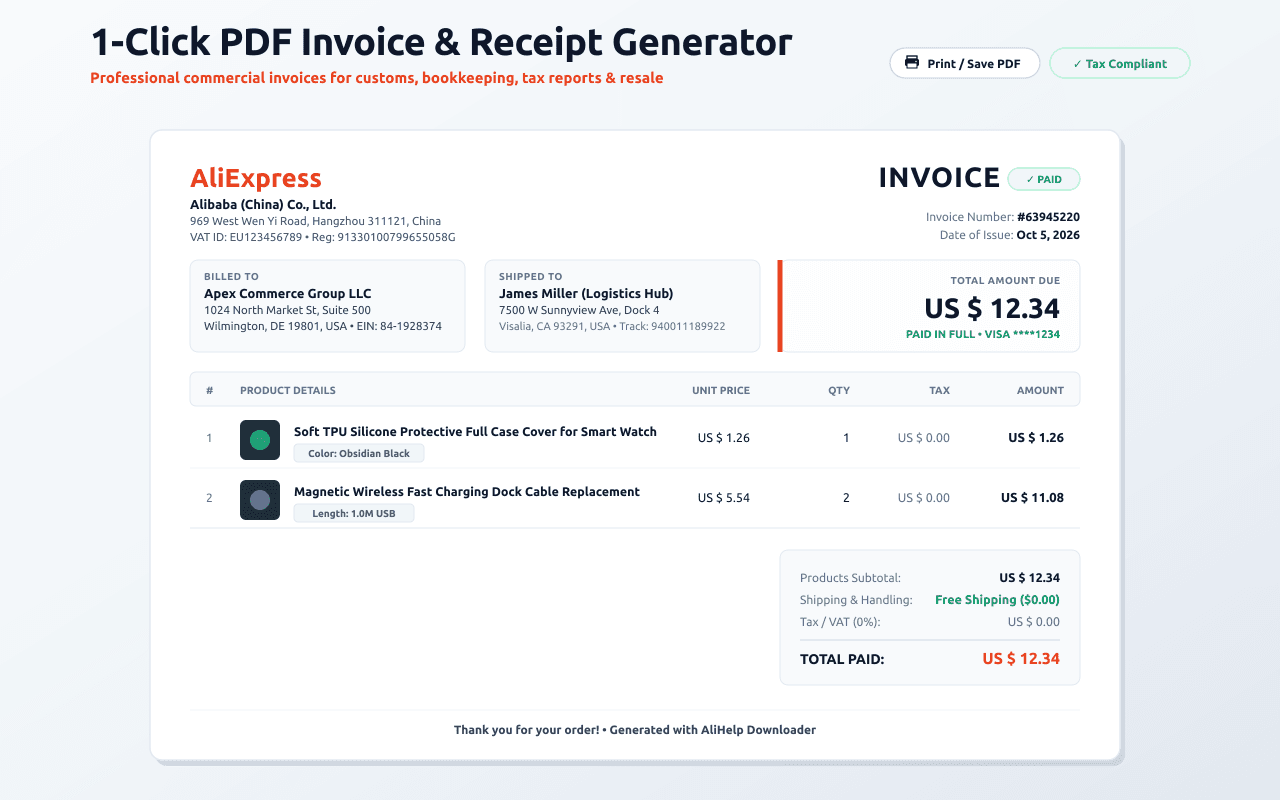
A proper commercial invoice, not a screenshot
Order number, store, shipping address, tracking ID, itemized costs, shipping, tax and the total - laid out for A4 so it prints or saves as a PDF your accountant will accept.
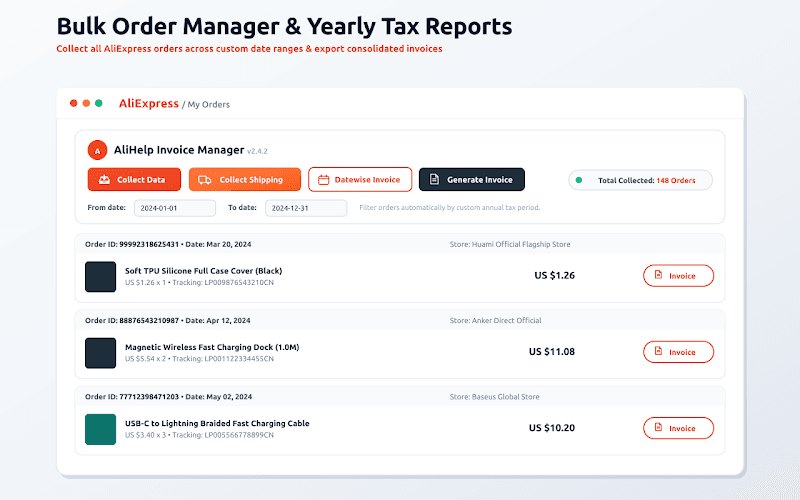
A year of orders in one pass
Set a date range - a quarter, a tax year - and the manager collects every order in it, with an Invoice button beside each one and a consolidated summary to export.
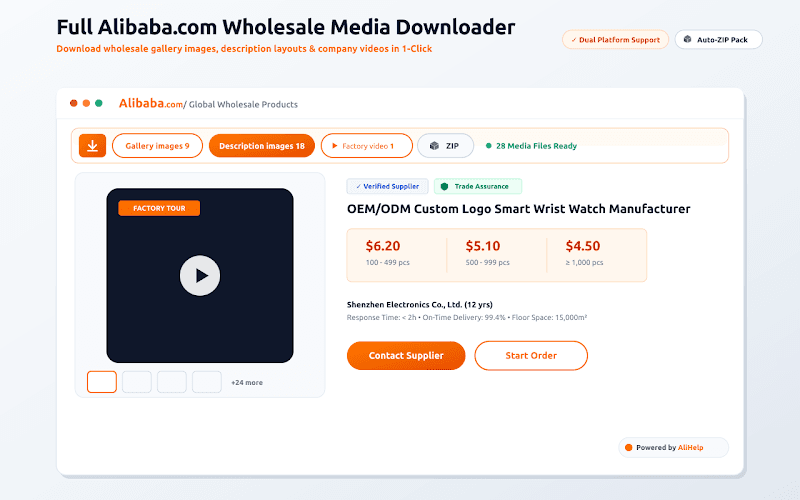
Alibaba wholesale pages too
The same toolbar on Alibaba supplier listings: gallery images, description layouts and factory tour videos, packed into a ZIP for sourcing research.
Up and running in under a minute
Install it once. There is nothing to configure, no account to create and no key to paste.
Add it to Chrome
Install from the Chrome Web Store. It is free, and it asks for access to AliExpress and Alibaba pages only.
Open a product or order page
On any AliExpress or Alibaba listing the AliHelp toolbar appears near the top on its own. On your orders page an Invoice button appears beside each purchase.
Click what you need
Main images, variant images, review images or video - or Download All. For paperwork, click Invoice to view, print or save the PDF.
Built for people who do this every day
Product media and order paperwork are the two chores that eat a sourcing day. This handles both.
E-commerce store owners & retailers
Collect high-resolution supplier imagery, variant photos and genuine customer feedback media for your own product catalog - without rebuilding every listing by hand.
Product sourcing & research specialists
Work through supplier catalogs quickly: download factory showcase videos, archive competitor listings and keep a record of what a product actually looked like.
Importers & wholesale buyers
Inspect detailed specification graphics before committing to a bulk order, and export organized purchase records for order tracking and customs paperwork.
Accounting & administrative teams
Generate itemized PDF invoices and expense receipts for financial recordkeeping, filed by date range rather than chased order by order at year end.
What people use it for
“Absolute lifesaver for my dropshipping business! Downloading high-res product photos and videos from both AliExpress and Alibaba used to take hours, but now it's done in one click. Super fast and clean interface.”
“I love how easily it extracts high-quality video clips from product pages. It saves me so much time when creating ads for my Shopify store. Highly recommend to any e-commerce seller!”
“Works like a charm! No corrupt files, no quality loss, and handles batch downloads effortlessly. Definitely one of the most useful Chrome extensions I've installed this year.”
“Simple, lightweight, and extremely effective. I used to manually screenshot and edit product pictures, but this downloader does everything automatically in seconds!”
“Absolute lifesaver for my dropshipping business! Downloading high-res product photos and videos from both AliExpress and Alibaba used to take hours, but now it's done in one click. Super fast and clean interface.”
“I love how easily it extracts high-quality video clips from product pages. It saves me so much time when creating ads for my Shopify store. Highly recommend to any e-commerce seller!”
“Works like a charm! No corrupt files, no quality loss, and handles batch downloads effortlessly. Definitely one of the most useful Chrome extensions I've installed this year.”
“Simple, lightweight, and extremely effective. I used to manually screenshot and edit product pictures, but this downloader does everything automatically in seconds!”
AliExpress downloader questions
How do I download AliExpress images in one click?+
Install the extension, open any AliExpress product page, and the AliHelp toolbar appears near the top on its own. Click 'Main images' to save the whole gallery, or 'Download All' to take the gallery, the variant photos, the description graphics, the review media and the video together. There is nothing to set up first.
Does it download the original full-resolution images?+
Yes. Files come from AliExpress's own CDN at the resolution the seller uploaded, not the resized version shown on the page. That is the difference between an image you can use on a store listing and a screenshot you cannot.
Can I download AliExpress customer review photos and videos?+
Yes - that is one of the main reasons people install it. It loads the verified buyer feedback media on a listing, often several hundred photos plus unboxing videos, and saves them in one pass at full quality. It is also the fastest way to judge whether a product looks like its listing photos.
How do I get a PDF invoice for an AliExpress order?+
AliExpress does not hand you a commercial invoice. Open your orders page and an 'Invoice' button appears beside each purchase - click it and you get a structured, itemized invoice with the order number, store, shipping address, tracking ID, unit prices, quantities, shipping and the total, laid out for A4 so it prints or saves straight to PDF.
Can I export a whole year of AliExpress orders for tax?+
Yes. The order manager takes a custom date range - a quarter, a financial year - collects every order inside it and produces a consolidated summary with an invoice available for each one. It is built for the week you spend reconciling a year of purchases.
Does it work on Alibaba as well as AliExpress?+
Both, with the same extension. On an Alibaba supplier page it pulls the wholesale gallery images, the description layouts and the factory tour video. You do not need a second tool for wholesale sourcing.
Does it download variant images and the hidden description graphics?+
Yes. Variant photos for every colour, size and model are saved separately rather than only the one on screen, and the specification tables, size charts and manufacturer infographics inside the expanded description area are included - those are the ones a manual save almost always misses.
Is it free, and does it add a watermark?+
It is free, with no account, no registration and no trial. Nothing is watermarked, renamed or re-encoded - files are saved exactly as they are hosted.
Is it safe, and what data does it collect?+
Everything happens locally in your browser. The extension reads the AliExpress or Alibaba page you are already looking at to find the media and the order details, and the downloads go straight to your computer. It does not need a login, and your order data is not uploaded anywhere.
Will it work in Edge, Brave or Opera?+
Yes. It installs from the Chrome Web Store and runs in any Chromium-based browser - Chrome, Edge, Brave, Opera and Vivaldi all use the same extension.
How are the downloaded files organized?+
Assets are sorted into a folder named after the product, so files from different listings never mix, and you can pack a product's media into a single ZIP archive for storage or for sending to a designer.
Ready to try it?
Free, no account needed. Install it from the Chrome Web Store and start using it on your next AliExpress or Alibaba search.
Add to Chrome - It's Free